Wero payments
Available from Version: 20260629

|
Wero is a European payment solution developed by the European Payments Initiative (EPI), a consortium of major European banks and payment providers.
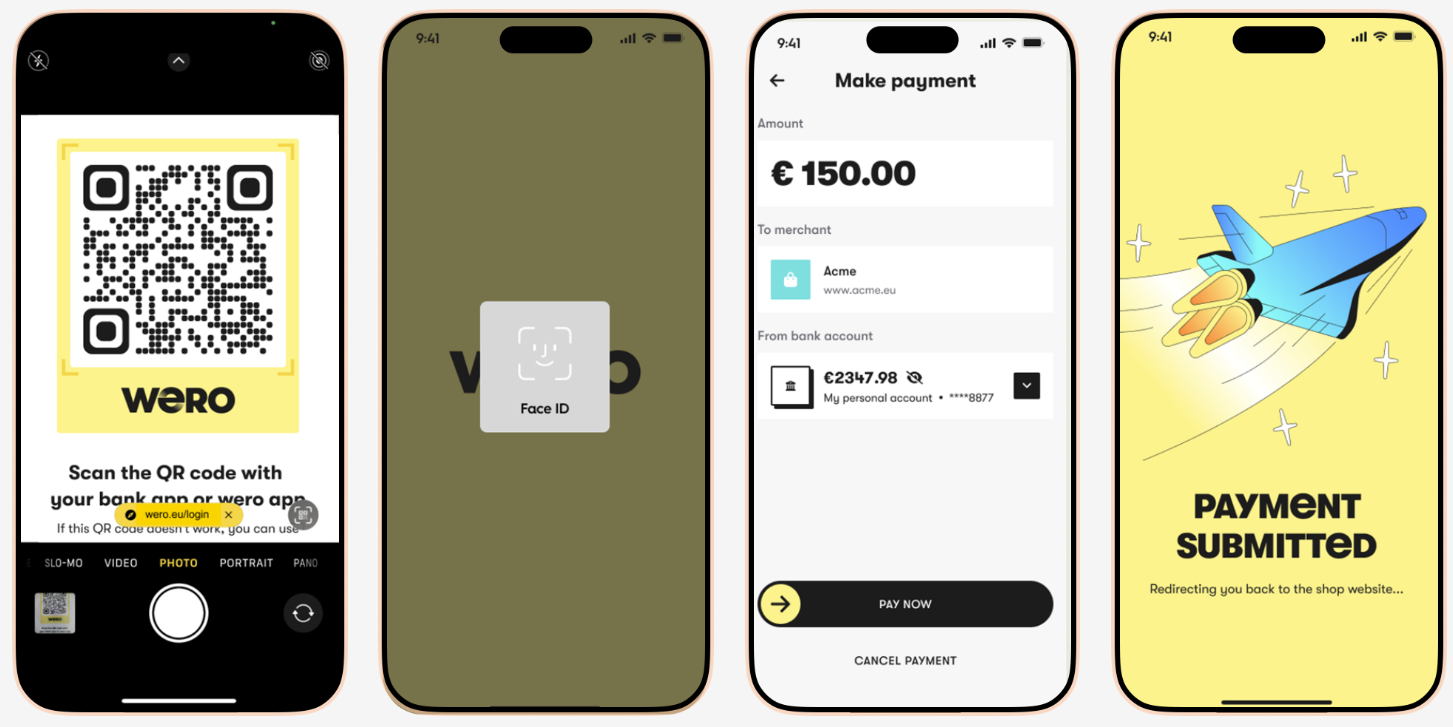
Its goal is to provide a single payment method for Europe based on SEPA Instant account-to-account payments, reducing fragmentation between local payment schemes. Instead of paying with a card, the customer authorizes a payment directly from their bank account using their banking app, or the standalone Wero app. Funds are transferred almost instantly over SEPA Instant rails. |
|
Wero general properties
| Available country codes |
|
| Currency | EUR |
| Minimum transaction amount | 0.01 EUR |
| Maximum transaction amount | Depends on the bank |
| Refund |
|
| Chargeback | No |
| Integration category | Asynchronous |
 Scope of Integration
The following features are not supported:
How it works
The processing of payments for goods using Wero consists of one step, during which the capture of the payment takes place.
Capturing a Payment
The following diagram illustrates the steps involved in capture payment that are relevant to you as a merchant.
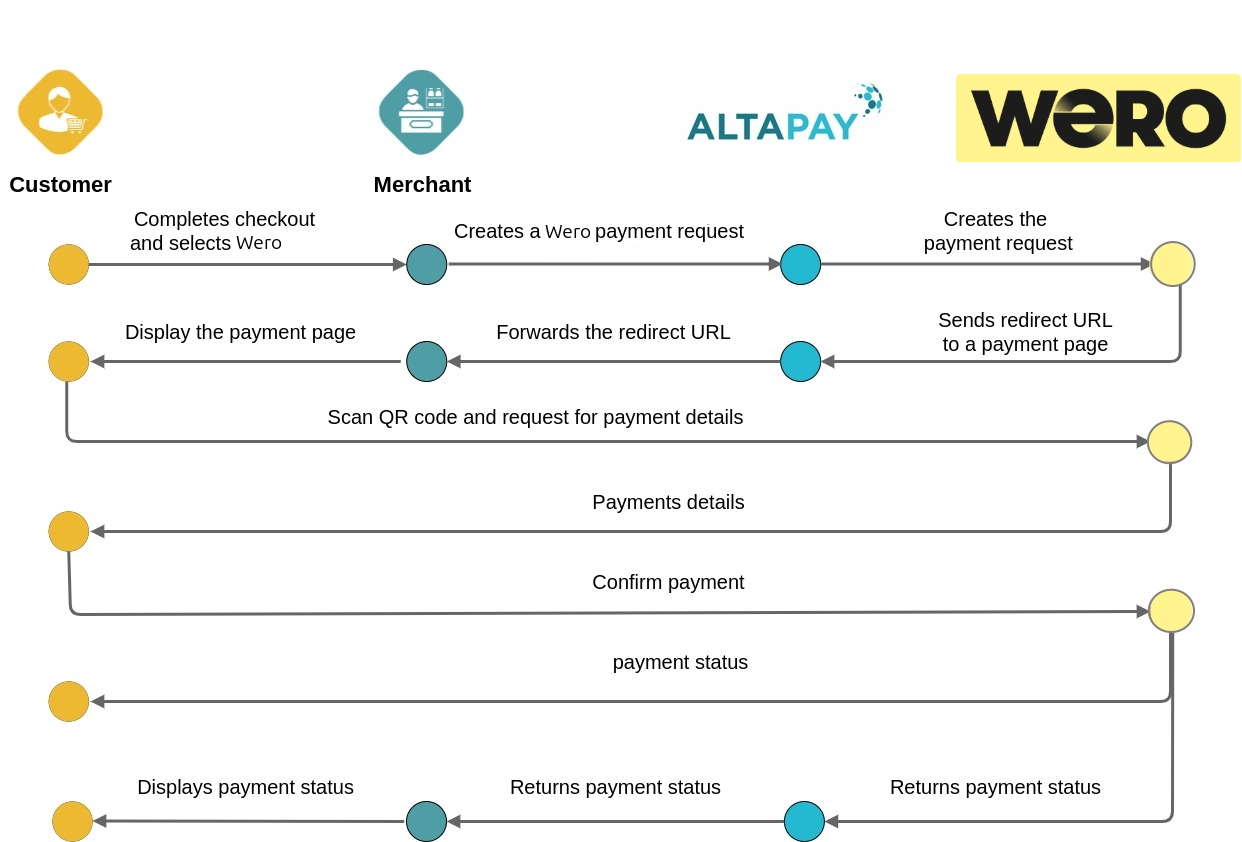
- The customer selects Wero during checkout.
- The merchant creates a payment request through MarketPay Online.
- MarketPay Online forwards the payment request to Wero.
- Wero returns a redirect URL.
- The customer is redirected to the Wero application or their banking application.
- The customer reviews and confirms the payment.
- Wero processes the payment.
- MarketPay Online receives the payment result.
- The merchant receives the payment status.
- The customer is redirected back to the merchant website.
Integration Scenarios
Checkout
Our Checkout API solution supports Wero out of the box, meaning that it works as any other payment method. Whenever Wero is enabled / configured it will be returned as a payment method.
Merchant API
To find out how to integrate with Wero directly to the Gateway using our merchant API, see Integrating using the Merchant API
- Pre-step: Setting up a server-to-server session. Create a session containing all information needed to process the payment (except for the payment instrument data). This call returns a session ID required in the next call. For more details on setting the checkout session, see checkoutSession.
- Transaction Execution: Provide the payment details in a second server-to-server call on the gateway endpoint to create payment request with createPaymentRequest method.
Setting parameters in createPayment Request
See the mandatory and configurable parameters by selecting Wero in the drop down list on the Create Payment Request page
Processing a Refund
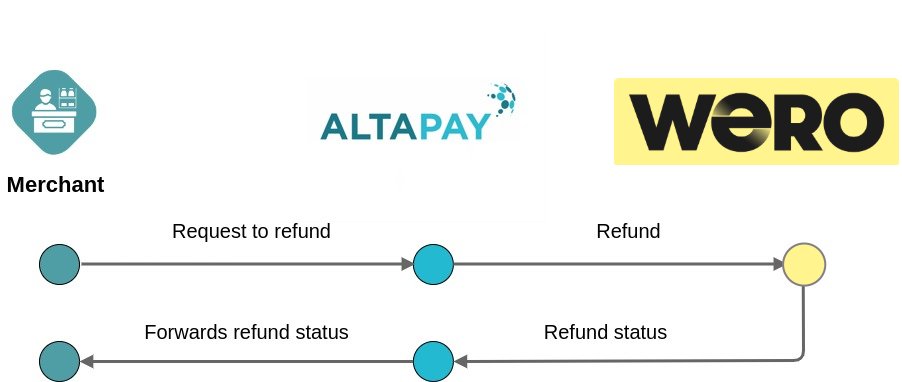
Refunds take place after the capture of funds. There are several refund scenarios.
- Full refund, which returns the funds for the entire transaction
- Partial refund, which returns the funds for some of the order lines
The flow is as follows:
Setting parameters in refundCapturedReservation Request
See the mandatory and configurable parameters by selecting Wero in the drop down list on the Create Refund Request page
Test the integration
You can test the Wero integration with us by using the MarketPay Online Sandbox. In order to do this, please check ePayment test integration page.